FameEX Futures Bonus Rules & Guide
2026-03-13 11:19:10The FameEX Futures Bonus is designed to help users experience USDT-margined perpetual futures trading in a zero-cost and zero-risk environment. When trading with our Futures Bonus, any profits generated will be converted at a 1:1 ratio into USDT and credited directly to the user’s futures account. Any losses incurred will be fully covered by FameEX, with no impact on the user’s own funds.
1. What Is the FameEX Futures Bonus?
The FameEX Futures Bonus is a form of virtual trial funds issued by FameEX exclusively for futures trading. It allows users to engage in simulated real-market futures trading to become familiar with the FameEX trading interface, order execution, and risk mechanisms, or to test users’ trading strategies without committing their own assets.
No deposit is required to use our FameEX Futures Bonus. If your trade with Futures Bonus generates profits, those profits will be converted at a 1:1 ratio into USDT. Throughout the trading process, no trading fees or funding fees are charged, which provides our users with a low-barrier environment to explore futures trading.
2. Futures Bonus Rules and Restrictions
To ensure your smooth experience, please carefully review the following rules:
(1) Basic Rules
Each Futures Bonus voucher comes with a fixed notional amount used as position margin, along with a specific trading pair, a fixed leverage level, and a validity period. Users must activate and use the Futures Bonus within its validity period. Expired bonuses will be automatically reclaimed by the system.
(2) Position Opening and Holding Restrictions
- Order Type: When placing an order using the FameEX Futures Bonus, only market orders are supported, and the entire bonus amount must be used at once (All-in). Partial usage or splitting the bonus is not supported.
- Margin Mode: Positions opened with the FameEX Futures Bonus default to isolated margin mode.
- Position Mode: At any given time, only one Futures Bonus position may be held. A new Futures Bonus cannot be activated until the current bonus position has been fully closed.
In addition, the FameEX Futures Bonus positions do not support adding to positions, reduce-only positions (partial close), hedge mode, limit close orders, or setting take-profit/stop-loss orders.
(3) Holding Duration and Position Closing
The maximum holding time for the FameEX Futures Bonus position is 24 hours. If the position is not manually closed within 24 hours after opening, the system will automatically trigger a forced liquidation to close your position at market price. Users may also manually end the trading experience at any time during the holding period by selecting “Close All” at the Market Price.
(4) Fees
When trading with the FameEX Futures Bonus, no trading fees or funding fees are charged. This fee exemption is one of the core advantages of the FameEX Futures Bonus.
3. Profit Settlement and Fund Distribution
After your Futures Bonus position is closed, the system will settle profits and losses according to the following rules:
(1) Profit Settlement (Positive PnL)
If the trade results in positive PnL after closing, the profit portion will be automatically converted into USDT at a 1:1 ratio and credited to the user’s futures account.
*Example:
If a user trades with the FameEX Futures Bonus valued at 100 USDT and earns the profit of 20 USDT, then after settlement, 20 USDT in real funds will be credited to the user’s futures account. These funds can be used for trading or withdrawn.
(2) Loss Coverage (Negative PnL)
If a trade results in a loss, all losses are fully covered by FameEX. No portion of the user’s own funds will be deducted.
(3) Bonus Reclamation
Regardless of whether the trade ends in profit or loss, once settlement is completed, the original Futures Bonus amount will be automatically reclaimed and invalidated.
(4) Transaction History
Any profits generated from Futures Bonus trades will be displayed in the user’s transaction history as “Bonus Profit.”
4. Important Terms & Conditions
The FameEX Futures Bonus is a standalone trial fund and is not included in the user’s total account assets. It cannot be used to offset trading fees. Any orders placed using the FameEX Futures Bonus are not eligible for commissions, affiliate rewards, copy-trading profit sharing, or any other incentive programs.
If FameEX detects any abusive behavior, such as mass account registrations or hedging trades intended to exploit bonuses, the platform reserves the right to revoke bonus eligibility and restrict or suspend related accounts. FameEX reserves the final right to interpret and modify Futures Bonus rules without prior notice.
5. How to Use Your Futures Bonus on the Web Platform? (Step-by-Step Guide)
(1) How to Claim and View Your Futures Bonus?
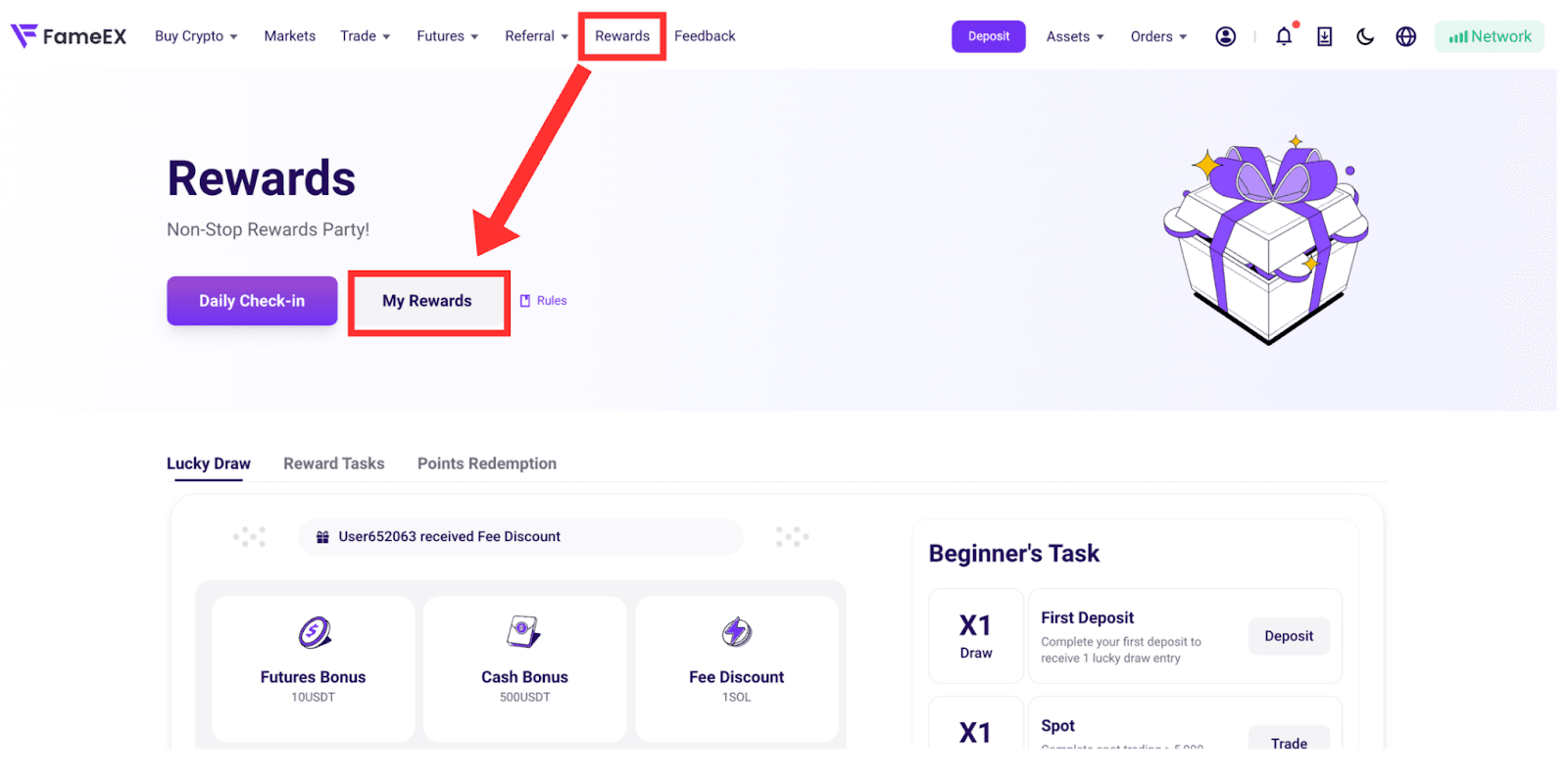
Log in to the FameEX website and go to the “Rewards” section and click “My Rewards” to view your available Futures Bonuses. Please confirm the bonus amount, supported trading pair, and validity period.
(2) Click to Use Your Bonus:
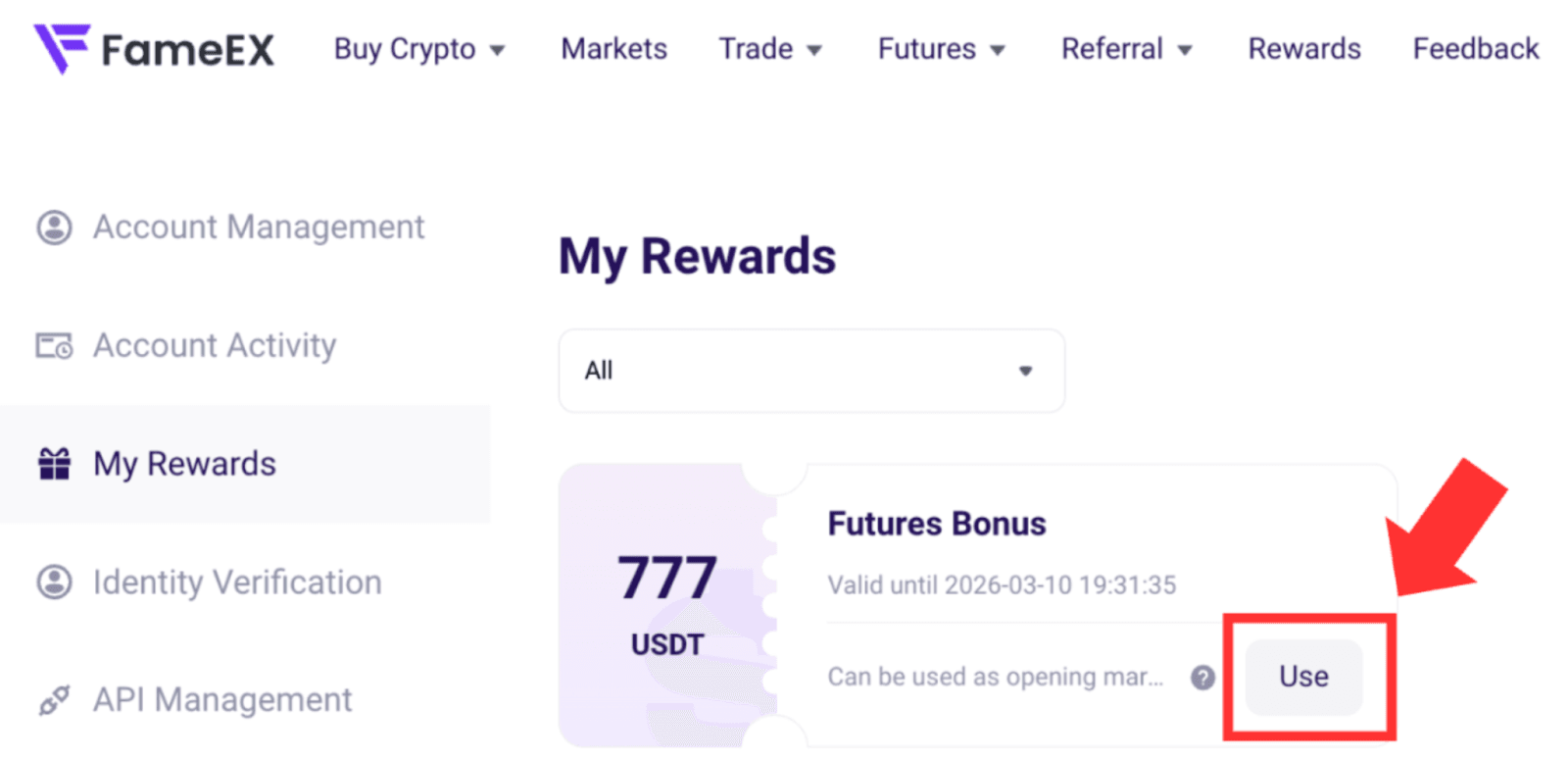
In the “My Rewards”, click the “Use” next to the relevant Futures Bonus. The system will automatically redirect you to the futures trading page.
(3) Place an Order with Your Bonus:
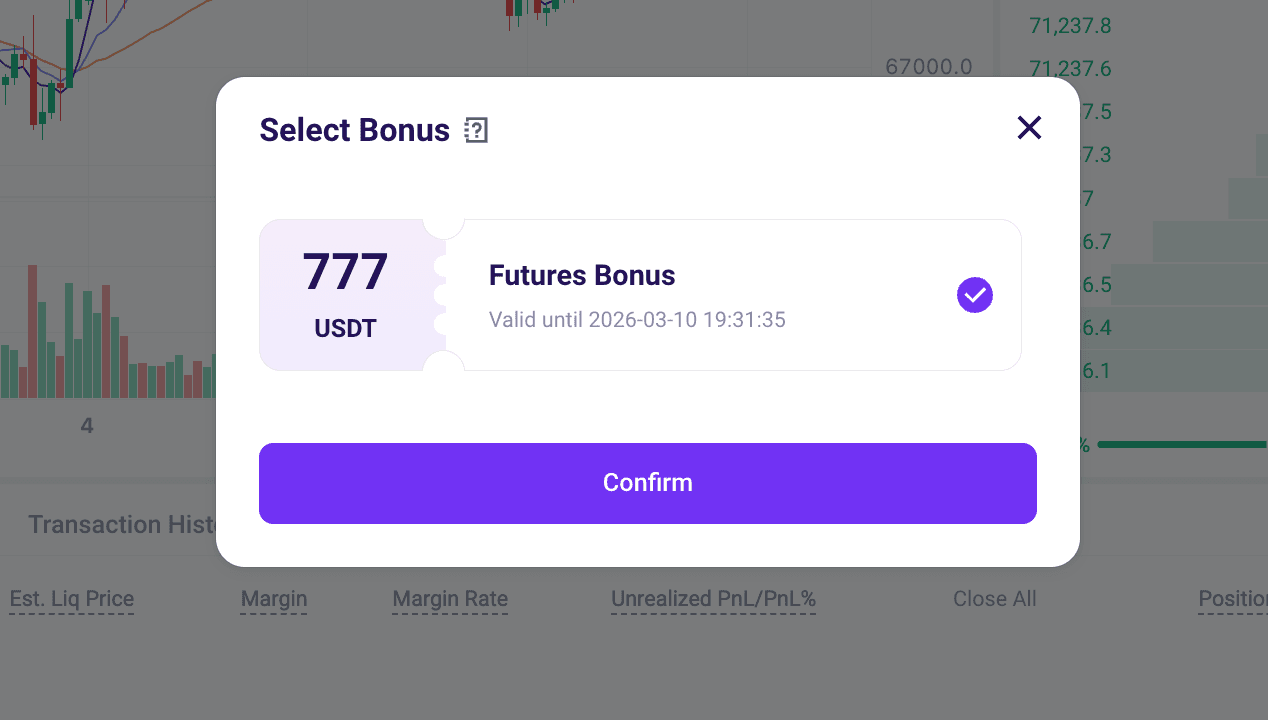
- After clicking “Use Bonus”, the system will automatically use the Futures Bonus amount as margin and adjust the corresponding leverage level. Click “Confirm” to use your Bonus.
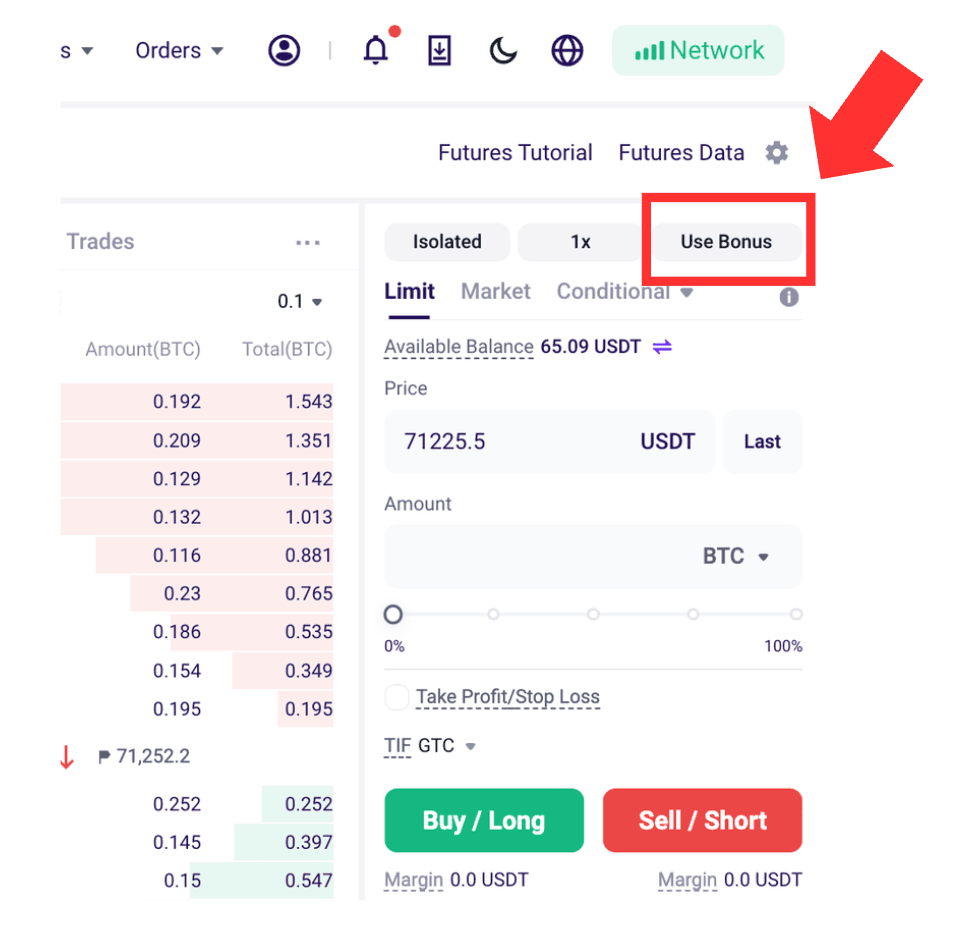
- Users just need to analyze market conditions and choose “Buy/Long” or “Sell/Short.”
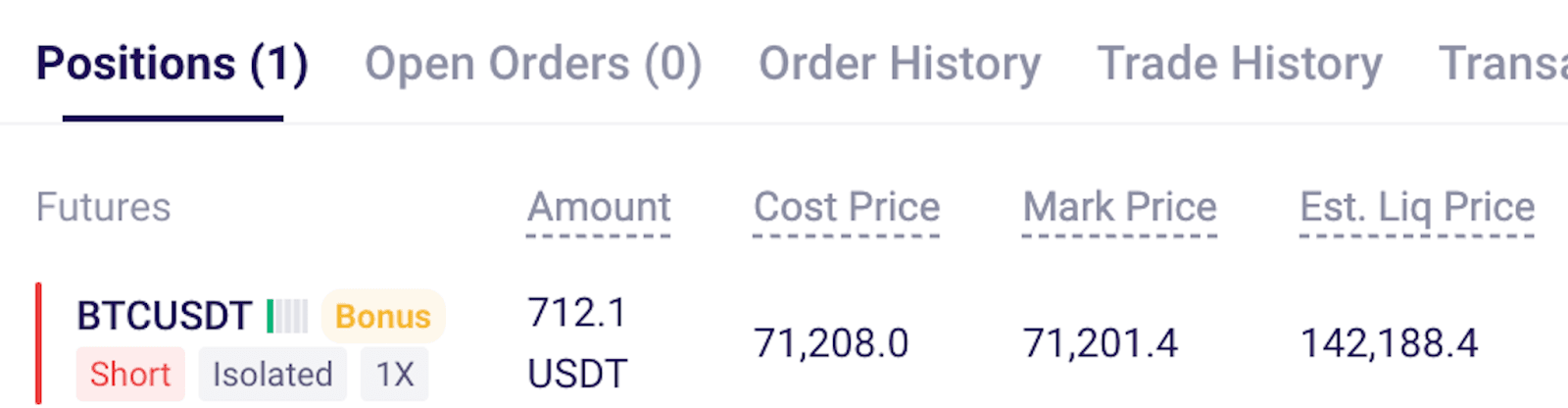
- Once the order is placed, it will be executed at market price, and a position marked as “Bonus” will be created.

(4) Check and Close the Position:
- In the Positions section, you can view the PnL of positions marked as “Bonus.”
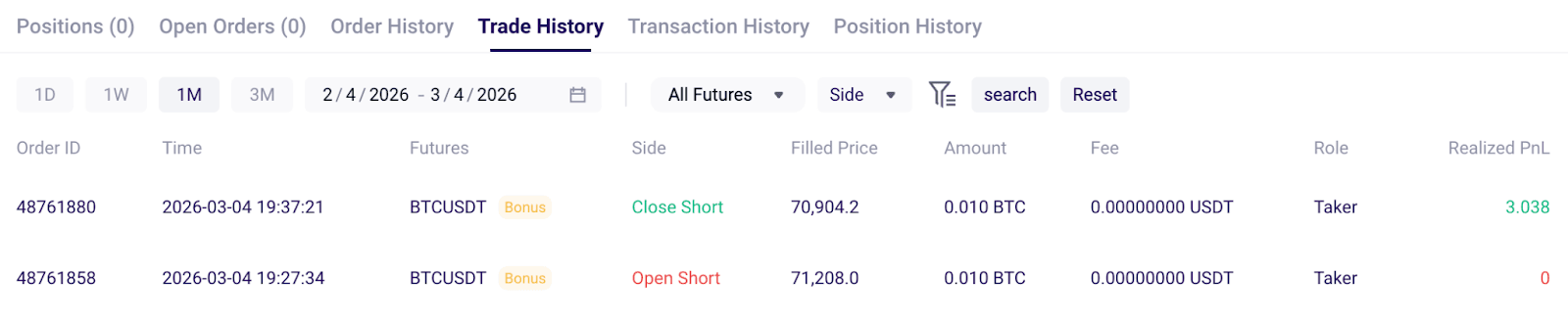
- Click “Close All” at market price to settle profits at any time, or wait for the system to automatically close the position at market price after 24 hours.
6. How to Use Your Futures Bonus on the App? (Step-by-Step Guide)
(1) How to Claim and View Your Futures Bonus?
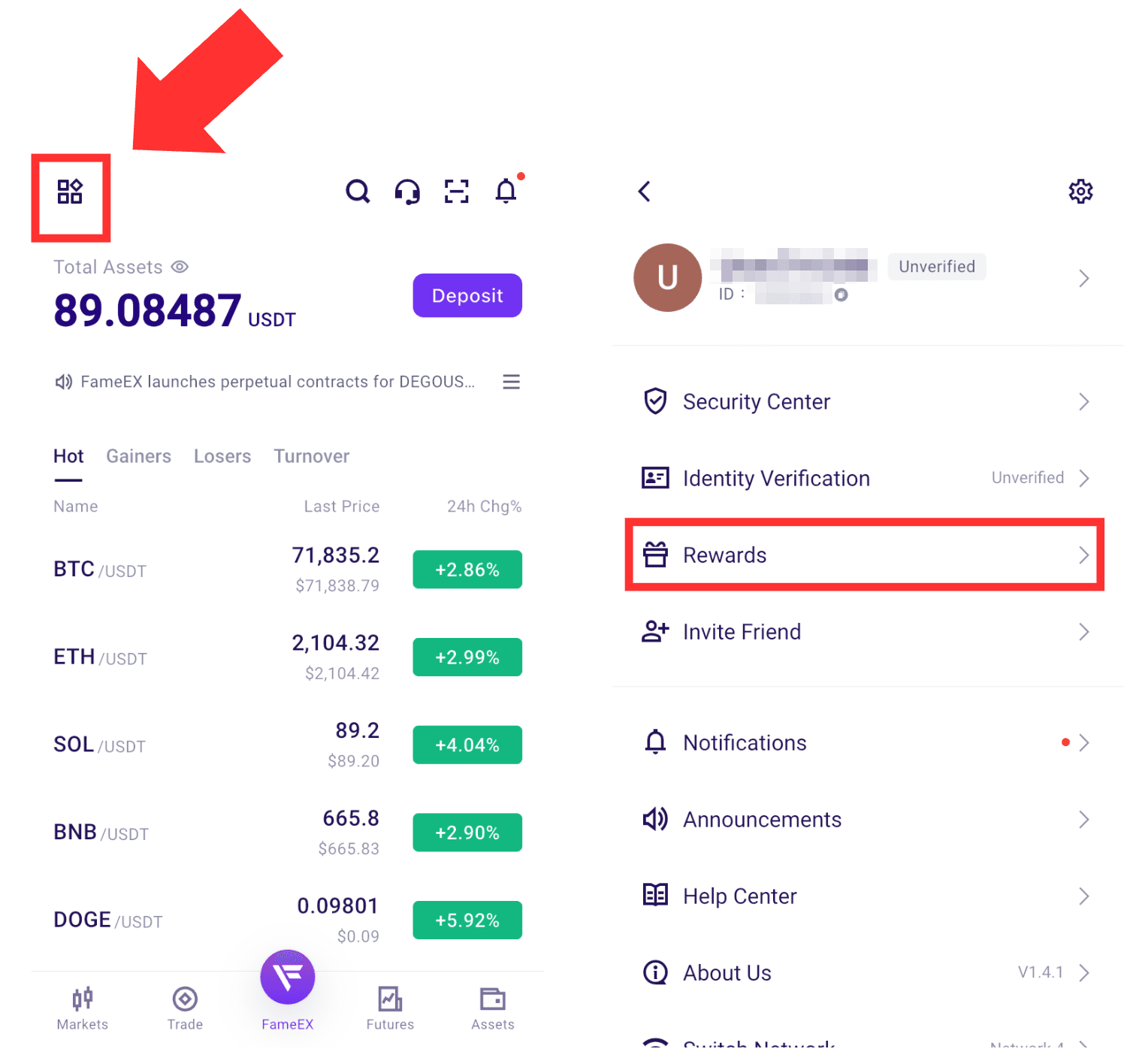
Log in to the FameEX app and tap the icon in the top-left corner. Go to the "Rewards" and tap "My Rewards" in the top-right corner to view your available rewards, such as Futures Trial Funds and Fee Coupons. Please make sure to check the reward value, applicable trading pairs, and expiration date.
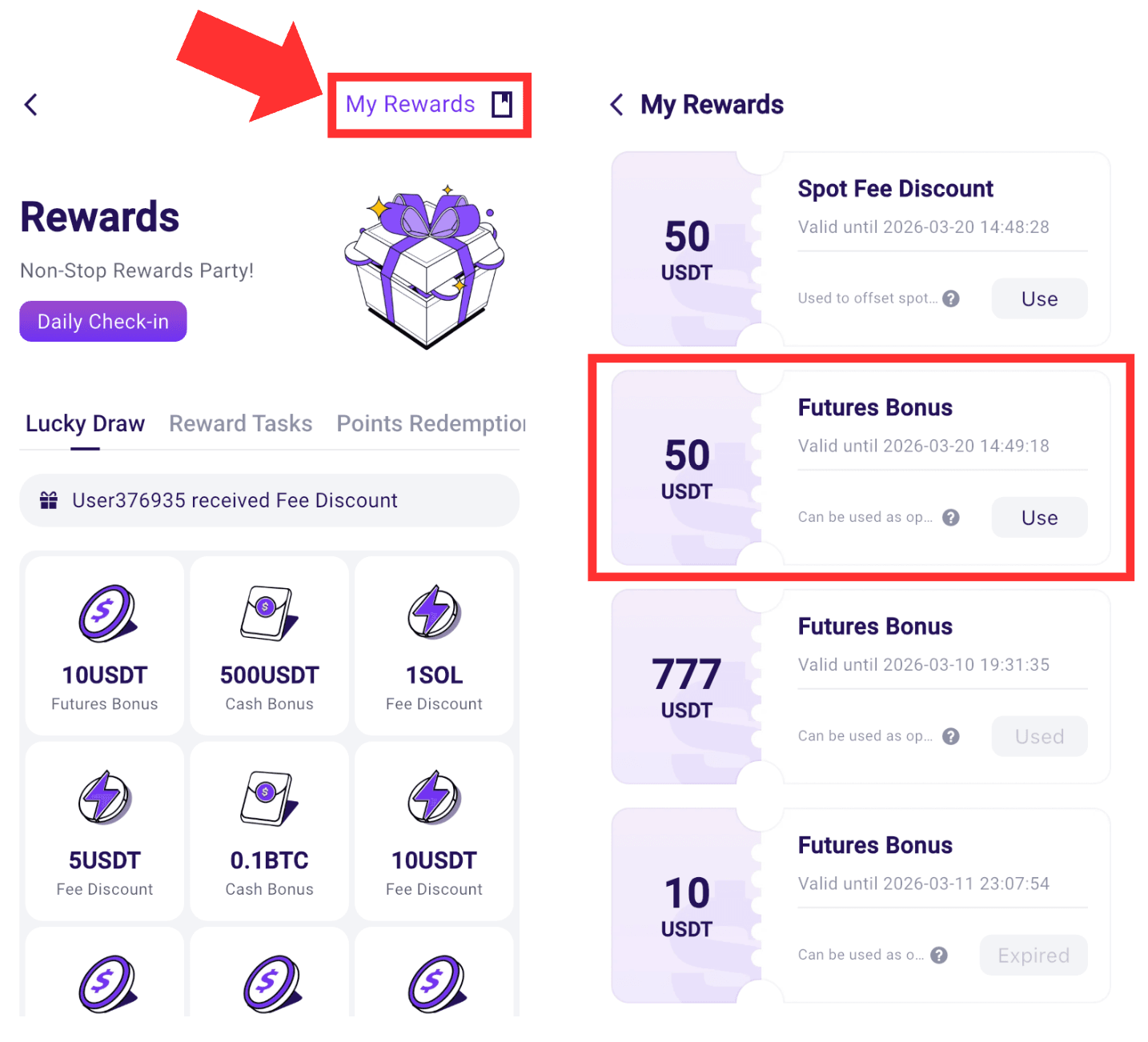
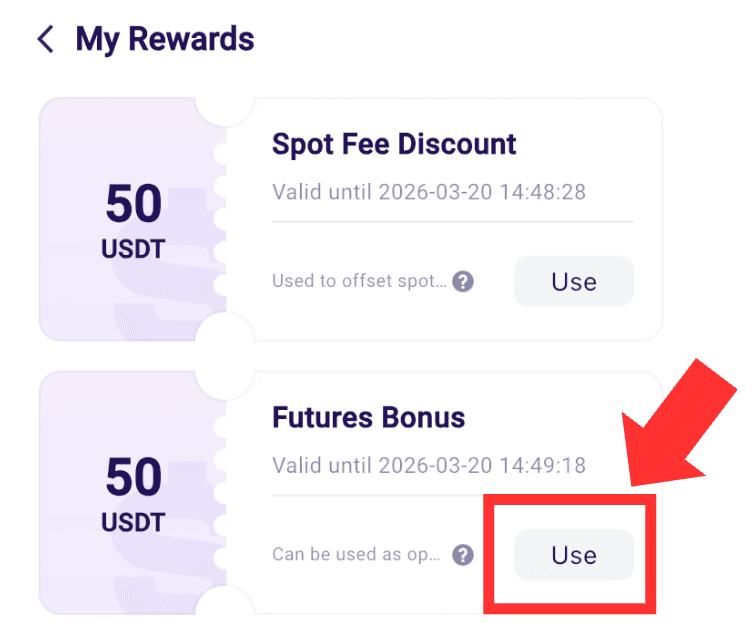
(2) Click to Use Your Bonus:
In the “My Rewards”, click the “Use” next to the relevant Futures Bonus. The system will automatically redirect you to the futures trading page.
(3) Place an Order with Your Bonus:
- After clicking “Use Bonus”, the system will automatically use the Futures Bonus amount as margin and adjust the corresponding leverage level. Click “Confirm” to use your Bonus.
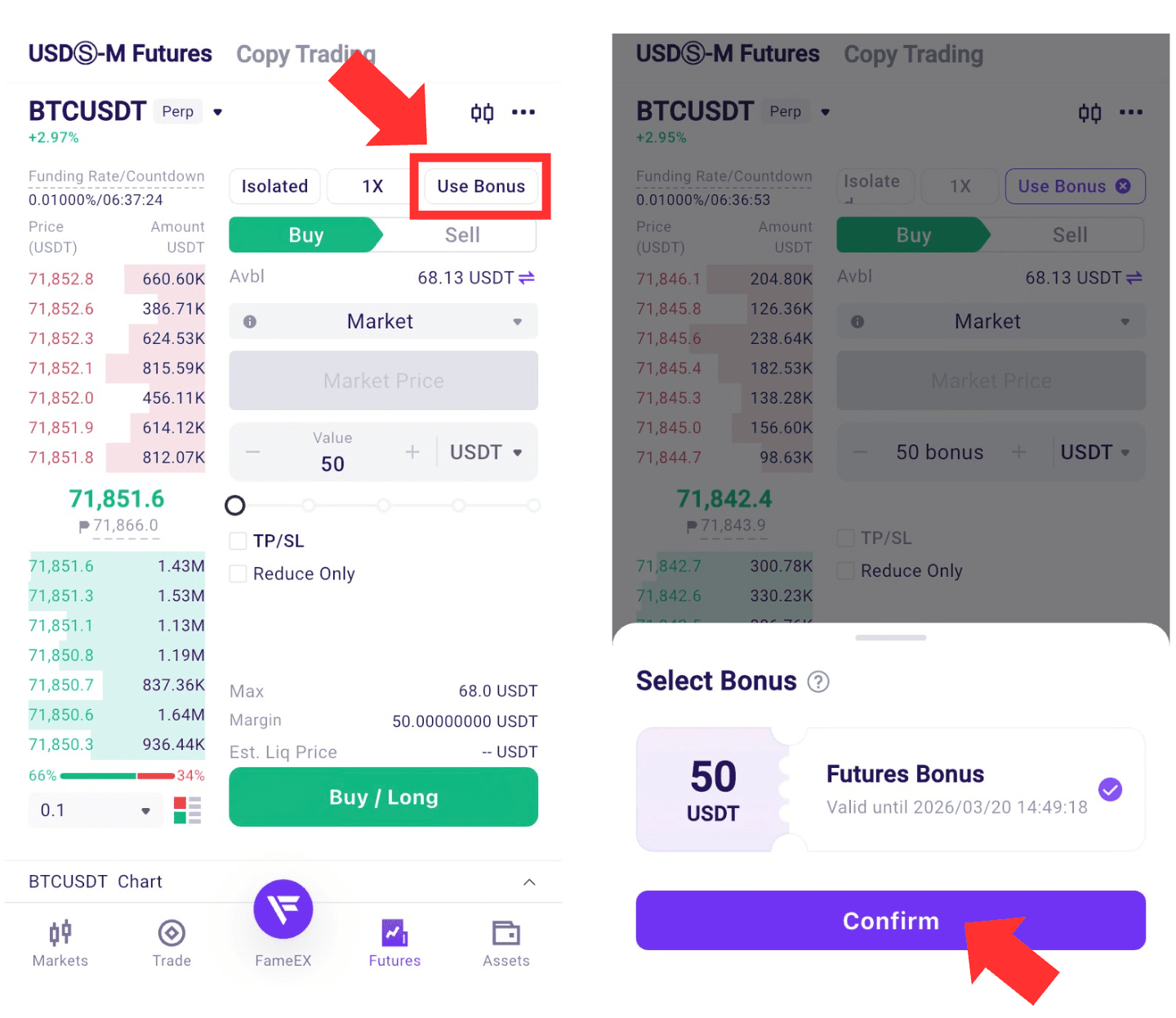
- Users just need to analyze market conditions and choose “Buy/Long” or “Sell/Short.”
- Once the order is placed, it will be executed at market price, and a position marked as “Bonus” will be created.
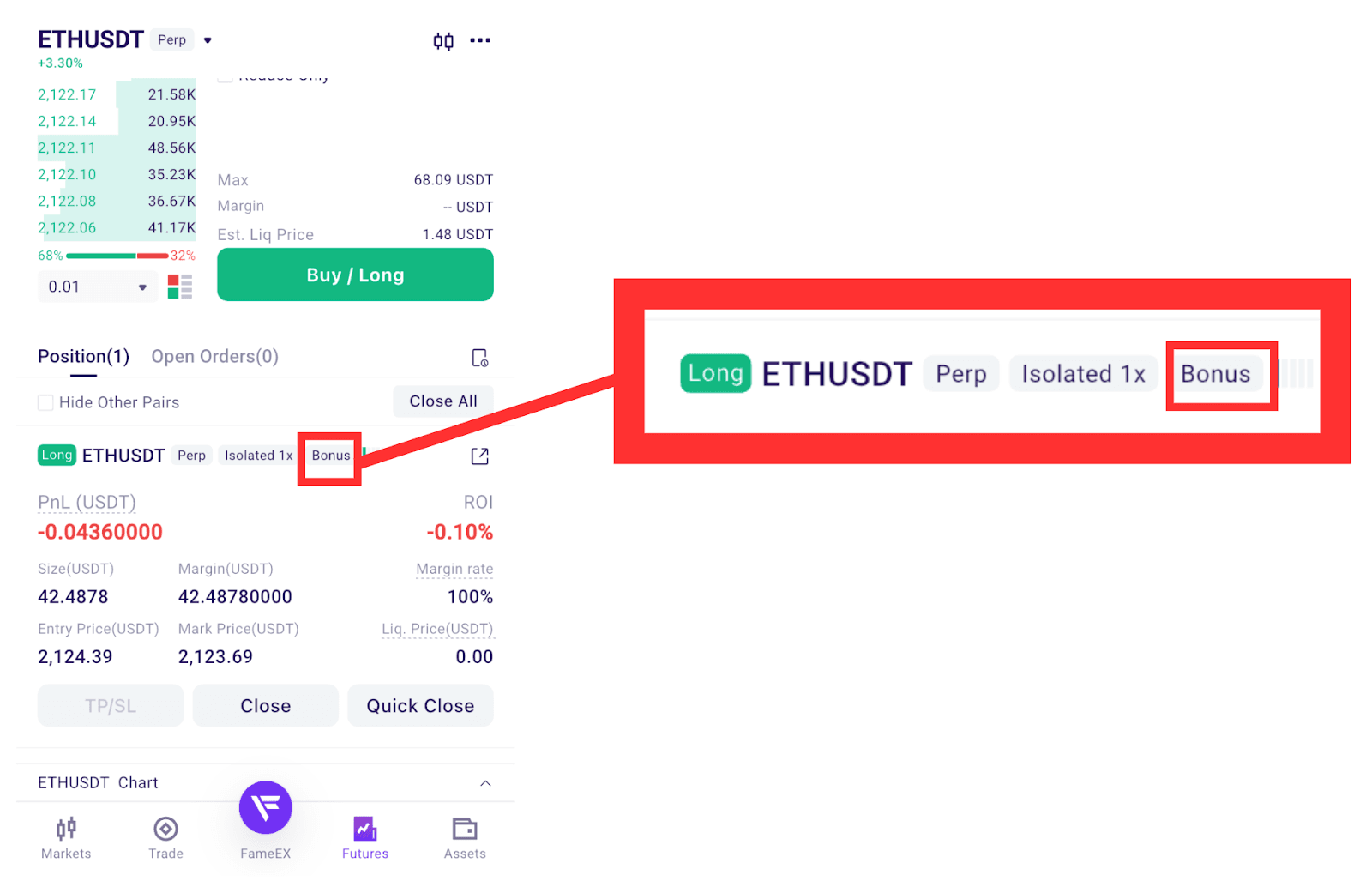
(4) Check and Close the Position:
- In the Positions section, you can view the PnL of positions marked as “Bonus.”
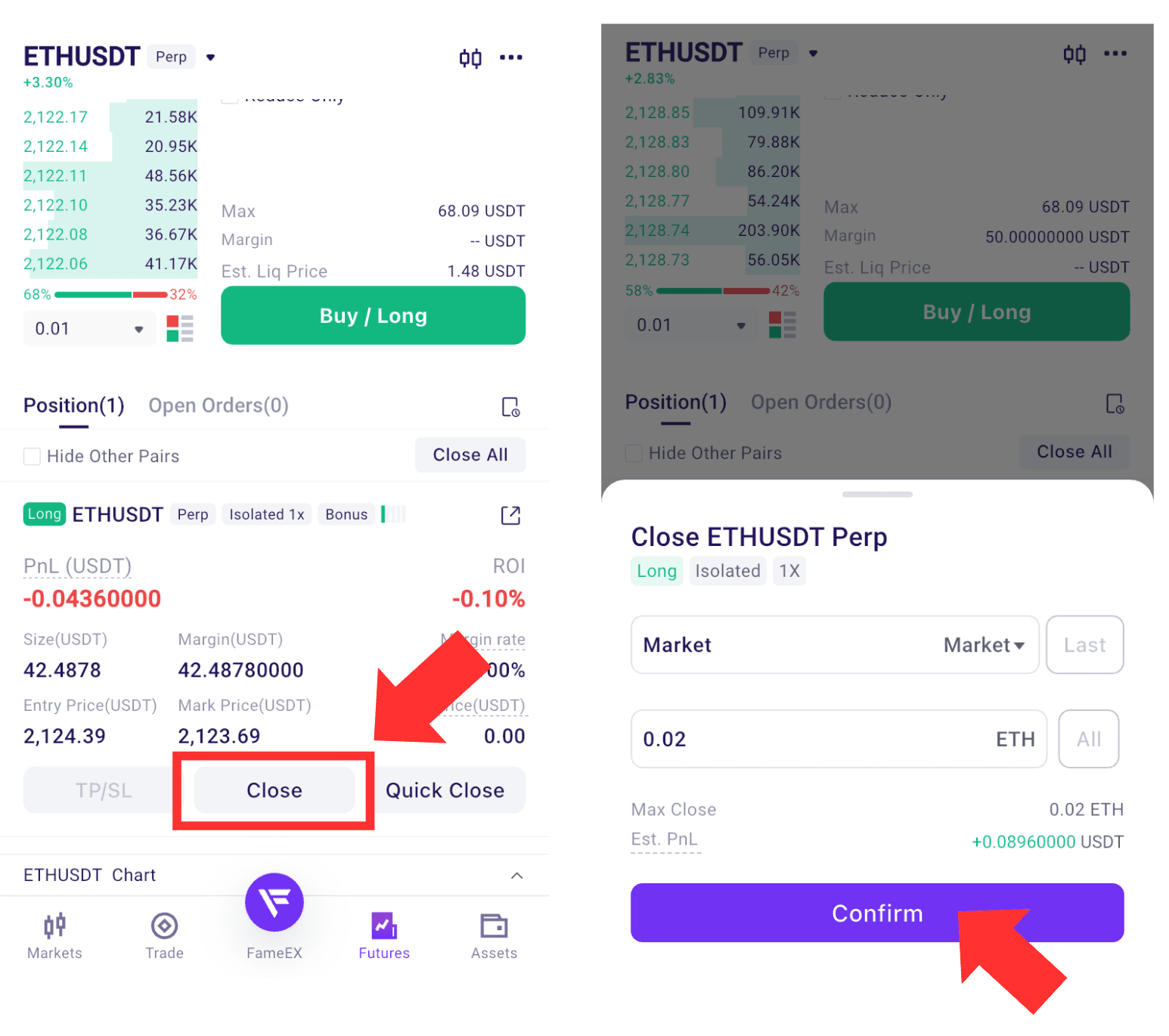
- Click “Close” at market price to settle profits at any time, or wait for the system to automatically close the position at market price after 24 hours.