How Can You Prevent Phishing Attacks?
2026-11-06 03:28:20Phishing is a common form of online fraud. Scammers may impersonate FameEX through fake websites, fraudulent emails, phishing text messages, or fake customer support accounts. These tactics are designed to trick users into revealing login passwords, verification codes, and other sensitive information. Some scammers may even attempt to persuade users to transfer their crypto assets to fraudulent wallet addresses. To reduce the risk of unauthorized account access and asset loss, users should verify official websites and communication channels. FameEX also provides official channel verification, Google Two-Factor Authentication (2FA), and other account security settings to help protect users. This guide explains common phishing tactics, how to identify suspicious messages, and what to do if you encounter a potential scam.
1. What Are Phishing Attacks and Common Phishing Scams?
A phishing attack occurs when scammers impersonate trusted websites, businesses, or service representatives to obtain confidential information. They typically use deceptive links, messages, or instructions to persuade users to reveal account passwords, verification codes, and other sensitive data. In cryptocurrency trading, scammers may copy the interface and branding of legitimate exchanges to create fraudulent websites that appear authentic. Users who enter their account details on these websites may unknowingly expose their credentials. Scammers can then use the stolen information to attempt unauthorized logins or other account activities.
Phishing attacks are not limited to fraudulent websites. They also occur through emails, text messages, and social media platforms. For example, scammers may claim that an account has experienced suspicious login activity, withdrawals will soon be restricted, additional security verification is required, or a promotional reward is available. They may then instruct users to click a link or scan a QR code. Some scammers also impersonate FameEX customer support representatives through messaging platforms such as Telegram and WhatsApp. They may offer assistance with account restrictions, withdrawals, or trading issues while requesting verification codes, installing unfamiliar software, or transferring assets to designated wallet addresses. These scams often use urgent warnings or strict deadlines to pressure users into taking action before verifying the source.
Therefore, recognizing phishing attempts requires more than checking whether a message displays the FameEX name or logo. Users should also verify the website address, communication channel, and legitimacy of any requested actions. Even if a notification appears official, requests for login passwords, verification codes, private keys, or transfers to unfamiliar wallet addresses should be treated with caution. Always verify suspicious requests through FameEX official channels before taking further action.
2. How to Identify Fake FameEX Websites and Fraudulent Messages?
1) Verify the Official FameEX Website and URL
The official FameEX website is www.fameex.com. Before logging in, trading, or managing your assets, enter the official URL directly into your browser or use a previously saved bookmark. Avoid accessing FameEX through links from unknown or unverified sources.
Some phishing websites use domain names that closely resemble the official FameEX address. They may include additional letters, numbers, or symbols to mislead users. A website displaying the FameEX logo or using an HTTPS connection is not necessarily legitimate. Always check the complete domain name before entering your account credentials or other sensitive information.
2) Use FameEX Official Channel Verification
If someone contacts you claiming to be a FameEX customer support staff, community admin, or platform employee, you can use FameEX Official Channel Verification to check whether the provided information belongs to an official FameEX channel. Follow these steps to verify a channel:
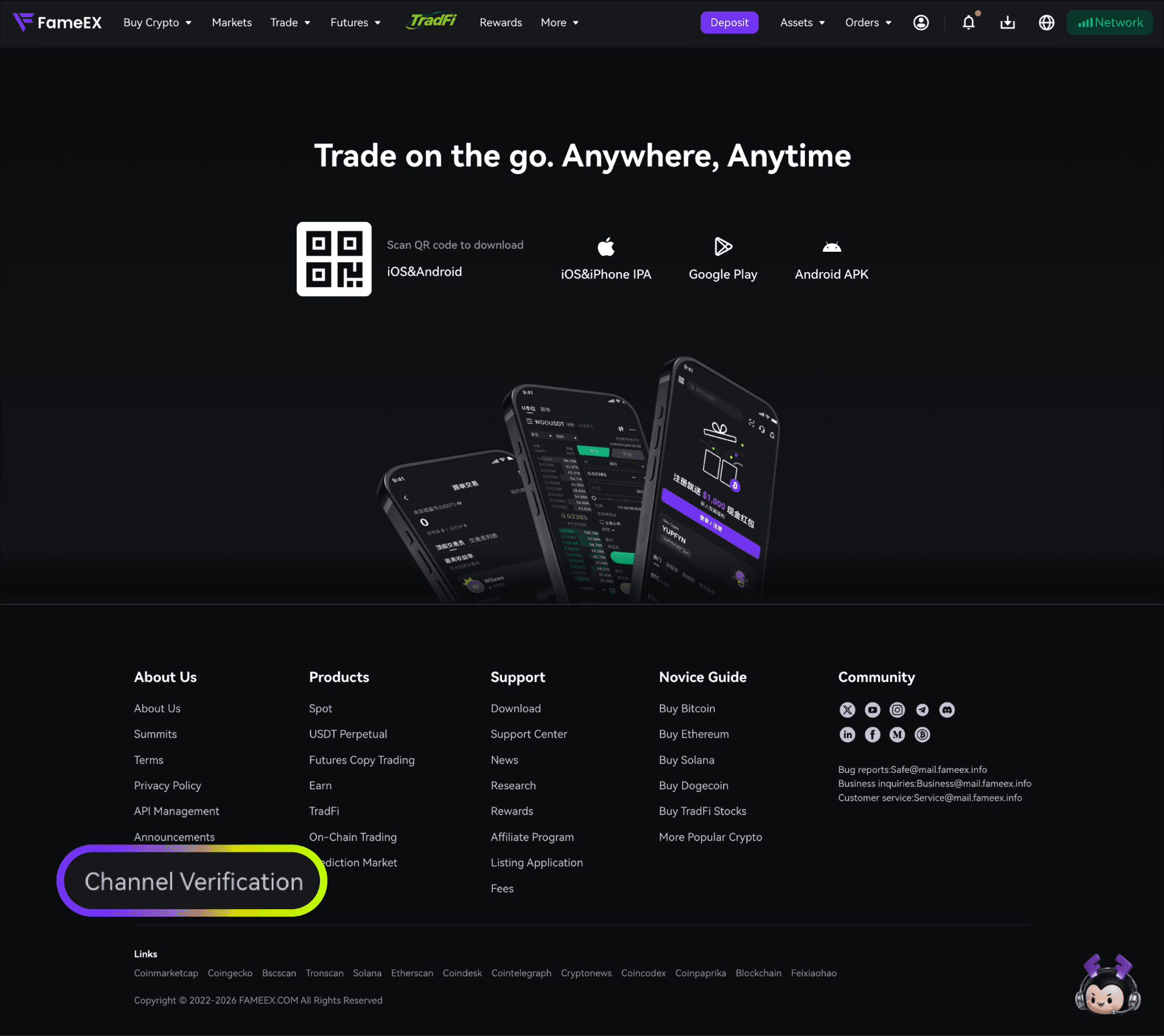
- Visit the FameEX Official [Channel Verification] page. Click [Select Channel] in the verification section and choose the type of channel you want to verify.
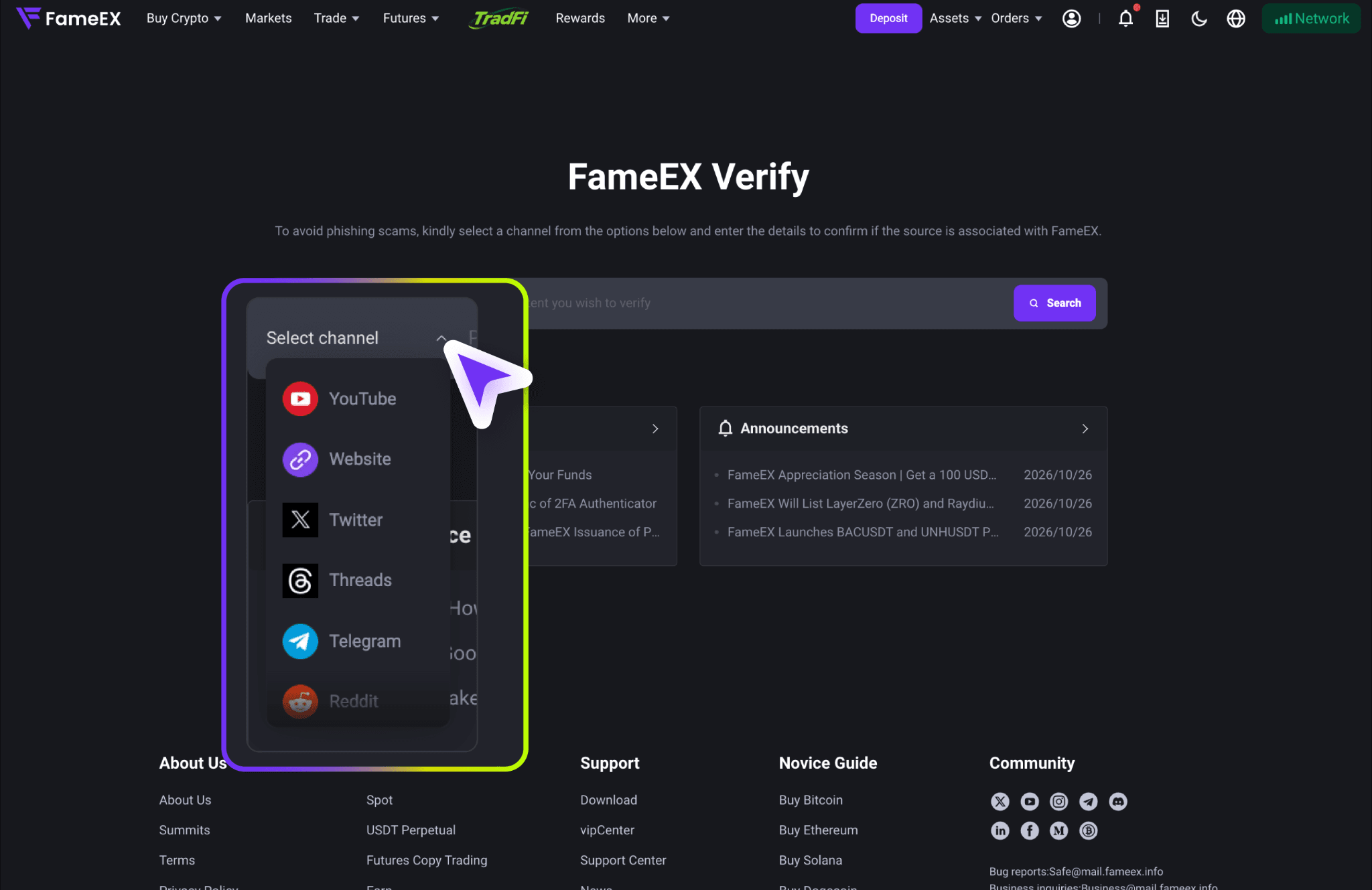
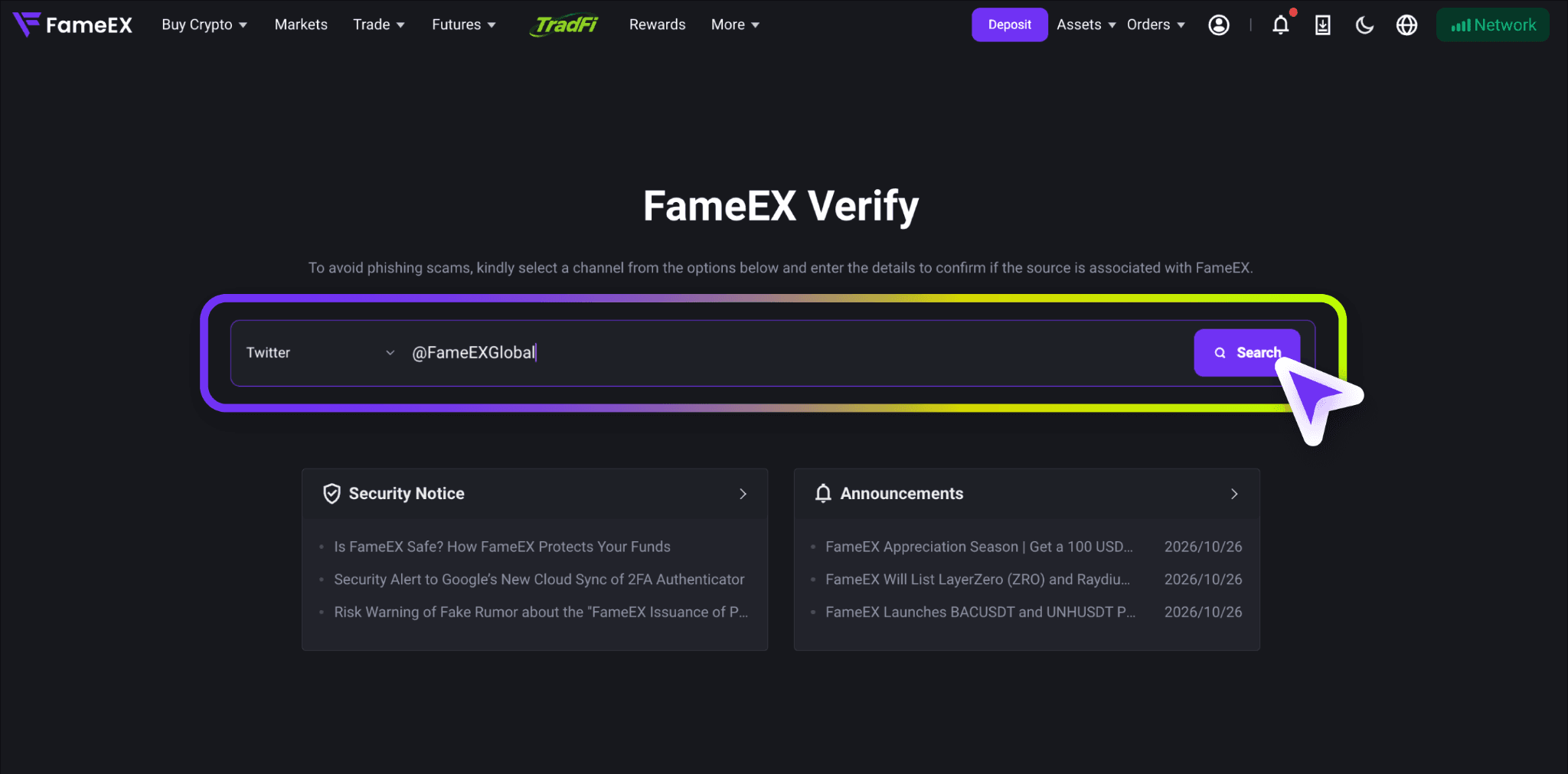
- Enter the website address, account username, or other relevant channel information in the input field. Check that the information is correct and click [Search].
- Review the verification result displayed on the page. If the result does not confirm that the source is an official FameEX channel, do not share account information or carry out any asset transactions as instructed. Contact FameEX official online customer support for further verification.
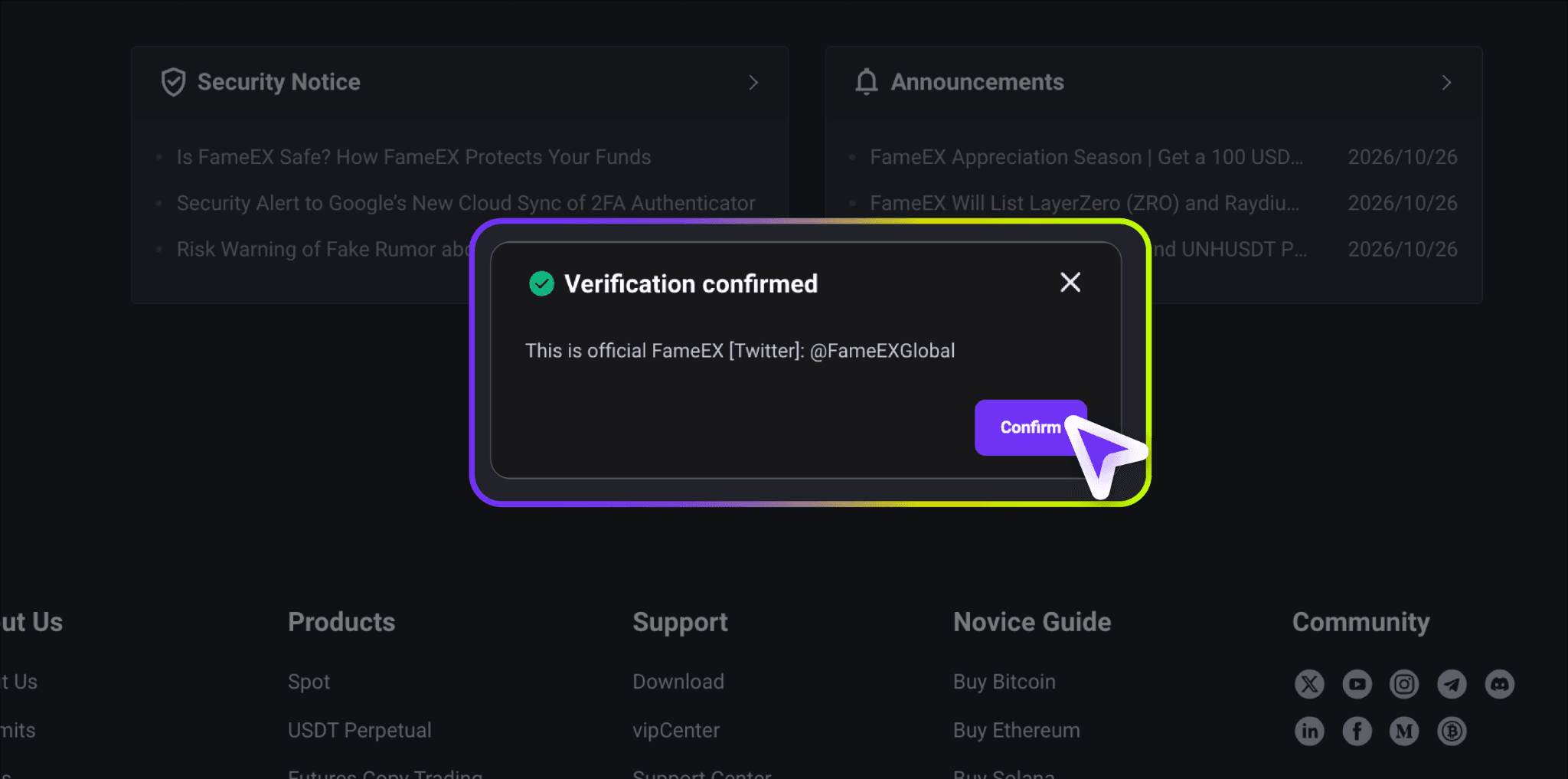
The Official Channel Verification feature helps users determine whether a communication source is associated with FameEX. However, it is still important to evaluate the content of each message. Even when a channel is verified, users should remain cautious about unusual transfer requests, suspicious attachments, or unreasonable security instructions.
3. Watch Out for Suspicious Emails, Text Messages, and Customer Support Requests
Phishing emails and text messages may closely resemble official FameEX notifications in wording, layout, and sender names. When receiving account verification requests, withdrawal confirmations, or security alerts, carefully review the sender's full email address and any links included in the message. Do not rely solely on the displayed sender name to determine whether a notification is legitimate. If a message asks you to enter your login password, provide verification codes, or visit an unfamiliar website, avoid clicking its links. Instead, access the official FameEX website or App directly to check your account status.
Please note that FameEX official customer support will never ask users to provide login passwords, SMS verification codes, email verification codes, or Google Authenticator codes. FameEX will also never instruct users to transfer assets to private wallet addresses to complete account verification, remove account restrictions, or restore withdrawal access. If you receive such a request, stop the interaction immediately and contact FameEX official customer support to verify its authenticity.
4. How to Improve FameEX Account Security Level and Prevent Phishing Attacks?
In addition to identifying fraudulent websites and suspicious messages, users should regularly review their FameEX account security settings. This helps reduce the risk of unauthorized account access if your login credentials are compromised. We recommend strengthening account protection through secure passwords, Google 2FA, careful verification of official communications, and safe device management practices.
1) Use a Unique Password and Enable Google 2FA
Create a strong and unique login password for your FameEX account. Avoid reusing passwords from your email account, social media platforms, or other websites. Using a separate password helps reduce the risk of unauthorized access if another service experiences a data breach.
We also recommend enabling Google Authenticator to add another layer of security to account logins and sensitive operations. This additional layer of security helps protect your account even if your login password is exposed. Keep your Google Authenticator codes and setup key secure. Never share them with third parties, as doing so could expose your account to unauthorized access.
For instructions on setting up Google Authenticator, please refer to the following guides:
- How to Enable, Disable, or Change Google Authenticator? (Web)
- How to Enable, Disable, or Change Google Authenticator? (App)
2) Verify Official Emails and Suspicious Notifications
When receiving an email or text message claiming to be from FameEX, check the sender's information, message content, and any included URLs before taking action. Do not assume a message is authentic simply because it contains the FameEX logo or a similar official-looking sender name. Scammers may create fraudulent notifications about account issues, security verification, withdrawal restrictions, or promotional rewards to trick users into visiting phishing websites and disclosing sensitive information.
If a message requests your login password, SMS verification code, email verification code, or Google Authenticator code, do not follow its instructions. Go to the official FameEX website or App directly to review relevant notifications. You can also use FameEX Official Channel Verification to check suspicious sources. If you are still unsure whether a message is legitimate, contact FameEX official online customer support for assistance.
3) Keep Your Devices Secure and Manage Your Assets with Caution
Keep your mobile devices, computer operating systems, and browsers updated to reduce exposure to known security vulnerabilities. Avoid installing Apps, browser extensions, or remote access software from unknown sources. If someone claims they need to resolve an account issue and asks you to share your screen, grant remote access, or disclose your Google Authenticator setup key, stop the interaction immediately. Such requests may expose sensitive information and put your account at risk.
Before making a cryptocurrency deposit, withdrawal, or transfer, carefully verify the recipient's wallet address, blockchain network, and transaction details. If withdrawal address whitelisting is available for your account, consider enabling it to reduce the risk of transferring assets to unauthorized addresses. Never transfer assets to wallet addresses provided by strangers or make advance payments in response to claims that additional fees are required to remove withdrawal restrictions.
4. What Should You Do If You Encounter Phishing or Expose Your Account Information?
If you receive a suspicious email, text message, or customer support request but have not entered any account information, stop interacting with the sender or suspicious website immediately. Do not click additional links, scan QR codes, or download attachments. If you have already opened a suspicious webpage, close it and visit the official FameEX website by entering the URL directly into your browser. If you have downloaded unfamiliar software or granted remote access permissions, revoke those permissions and check your device for security threats. Use a trusted device when taking further steps to secure your account.
If you have entered your FameEX login password, SMS verification code, or Google Authenticator code on a suspicious website, immediately access the official FameEX website from a secure device. Change your login password and review your account security settings. If you suspect that your linked email account, Google Authenticator, or other security credentials have also been compromised, take the necessary steps to secure them. Contact FameEX official customer support immediately to check for suspicious logins or unauthorized account activity. Do not attempt to log in again through the suspicious link, as this could expose additional verification information.
If you discover unauthorized withdrawals, asset transfers, or other suspicious transactions, contact FameEX official online customer support immediately. Preserve relevant evidence such as suspicious URLs, emails, text messages, chat records, transaction timestamps, wallet addresses, and on-chain transaction IDs (TxIDs). This information may assist with further investigation. If assets have already been transferred to a fraudulent address, confirmed blockchain transactions generally cannot be reversed. You should also report the incident to your local law enforcement authorities. For instructions on contacting customer support and requesting assistance from a human support, please refer to “How to Contact FameEX Online Customer Support?”.
5. FAQ (Frequently Asked Questions)
Q: How Can I Verify Whether a FameEX Website or Customer Support Account Is Official?
A: First, confirm that the website address is www.fameex.com. You can also use FameEX Official Channel Verification to check suspicious sources. If you cannot verify someone's identity or receive requests for verification codes, asset transfers, or unfamiliar software downloads, stop the interaction immediately. Contact FameEX online customer support through the official website for further assistance.
Q: Can Phishing Attacks Still Occur After Enabling Google 2FA?
A: Yes. Google 2FA provides an additional layer of account protection, but it cannot prevent users from voluntarily sharing verification codes with scammers. Even with Google 2FA enabled, you should verify website addresses and keep your authentication codes and setup key secure. Never enter sensitive account information on unfamiliar or unverified websites.
Q: Will Clicking a Phishing Link Put My Account at Risk?
A: Not necessarily. The level of risk depends on whether you entered account credentials, shared verification codes, downloaded malicious software, or granted access permissions. If you only opened the link and took no further action, close the suspicious page and check your device for potential security threats. If you disclosed sensitive information, change your account password immediately and review your security settings. Contact FameEX official customer support for additional assistance.