FameEX Asset Accounts Overview
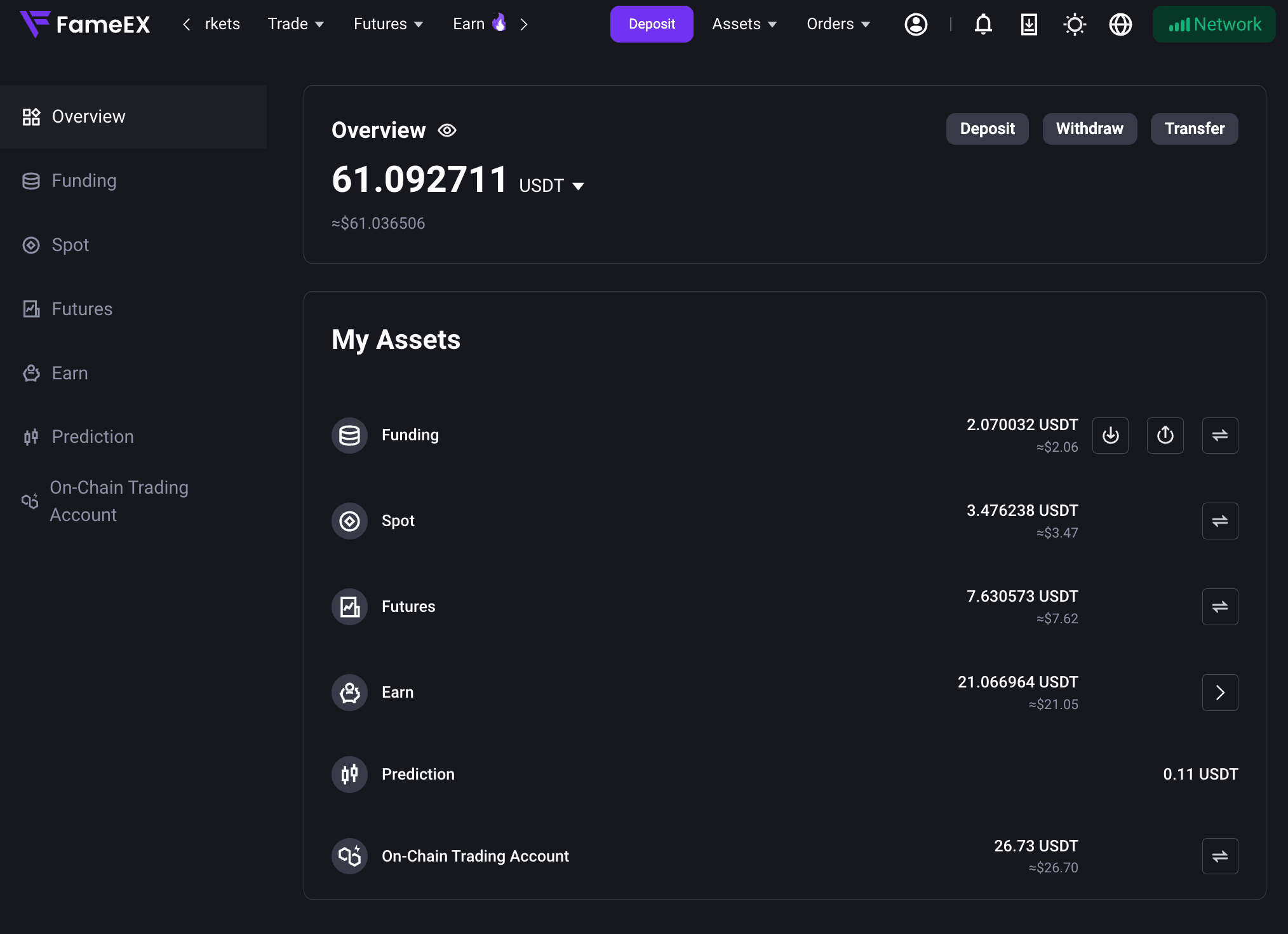
2026-09-17 06:25:05FameEX organizes your assets into different accounts based on the platform products and services you use. From the [Assets] page, you can view your total assets, the balance and estimated value of each account, and other asset details. You can also manage your assets based on your needs.
1. What Asset Accounts Are Available on FameEX?
FameEX currently provides the following asset account types:
Each account serves different products and asset purposes. Therefore, your total account balance and available balance may differ. Before using a specific product, make sure the required assets are held in the corresponding account and are available for use.
2. How Can I View My Assets?
You can view your total assets, account balances, estimated values, and other asset details from the [Assets] page on FameEX.
For detailed guide on checking your assets and transferring funds between accounts on Web or App, please refer to:
- How to View Your FameEX Assets and Transfer Funds? (Web)
- How to View Your FameEX Assets and Transfer Funds? (App)
3. How Can I Manage Assets Across Different Accounts?
Depending on the type of asset activity, you can use the corresponding function on FameEX.
Deposit Assets
A crypto deposit means transferring digital assets from another trading platform or personal wallet to your FameEX account. Once the deposit is credited, the assets will appear in your Funding Account.
For detailed guides on selecting a coin and network, obtaining a deposit address, and checking deposit records, please refer to:
Withdraw Assets
If you want to transfer digital assets from your FameEX account to another trading platform or personal wallet, you can use the [Withdraw] function.
For detailed guides on on-chain withdrawals, security verification, withdrawal addresses, network selection, and withdrawal records, please refer to:
Internal Transfers Between FameEX Users
If you want to send assets to another FameEX user, you can use the [Internal Transfer] function. You can transfer assets directly to the recipient's FameEX account using their UID, email address, or phone number. Internal transfers between FameEX users have no fee.
An internal transfer is different from an account transfer. [Internal Transfer] is used to send assets to another FameEX user, while [Transfer] is used to move assets between different asset accounts under the same FameEX account. For detailed guides, please refer to:
- How to Transfer Assets Between FameEX Users? (Web)
- How to Transfer Assets Between FameEX Users? (App)
Transfer Assets Between Accounts
Different FameEX products use assets held in their corresponding accounts. If you need to move assets to another supported account, you can use the [Transfer] function. Account transfers are only used to move assets between different asset accounts under the same FameEX account. They are different from [Internal Transfer], which is used to send assets to another FameEX user.
View Assets and Transaction History
To check your deposits, withdrawals, transfers, trades, or other balance changes, go to the corresponding asset or trading page to check the relevant records.
For more information on transaction history types, record details, and filtering options, please refer to:
- How to View Your FameEX Assets and Transaction History? (Web)
- How to View Your FameEX Assets and Transaction History? (App)
4. FAQs
Q: Why Do I Have Assets in My Account but Cannot Use Them for Trading?
A: Different FameEX products use available assets from their corresponding accounts. If your assets are currently held in another account, you may need to transfer them to the required account before trading. For example, spot trading uses assets in the Spot Account. Futures and TradFi products use available assets in the Futures Account.
Q: Why Is My Available Balance Different From My Account Balance?
A: Some assets may already be used for open orders, positions, Earn products, or other services. These assets may therefore not be included in your available balance. You can check the corresponding account or product page for more details.
Q: Why Does the Estimated Value of My Assets Change?
A: The estimated value of your assets changes with market prices. Even if the amount of an asset you hold remains unchanged, its estimated value may rise or fall as the market price changes.
Notes
- Different accounts may support different asset types, products, and operations. Please refer to the information shown on the relevant page.
- Account balance, available balance, and estimated value represent different types of asset information. Assets currently in use may not be included in your available balance.
- To review deposits, withdrawals, transfers, or other balance changes, check the relevant [Transaction History] or record page.
*Some feature names and page locations may change as the platform is updated. Please refer to the latest actual FameEX interface.