FameEX Security Settings Overview
2026-10-16 06:36:37FameEX offers several account security features, including login passwords, email verification, mobile number verification, Google Authenticator, and the withdrawal whitelist. These features help protect account access, verify user identity, and secure asset withdrawals. You can check the status of each feature under your account security settings and update them as needed.
1. What Security Settings Are Available on FameEX?
FameEX currently offers five main account security features:
Each feature serves a different security purpose. We recommend enabling multiple verification methods based on how you use your account to strengthen overall account protection.
2. How to View and Manage Your FameEX Security Settings?
You can view your current security settings and manage the available features through the FameEX website or App.
- Web
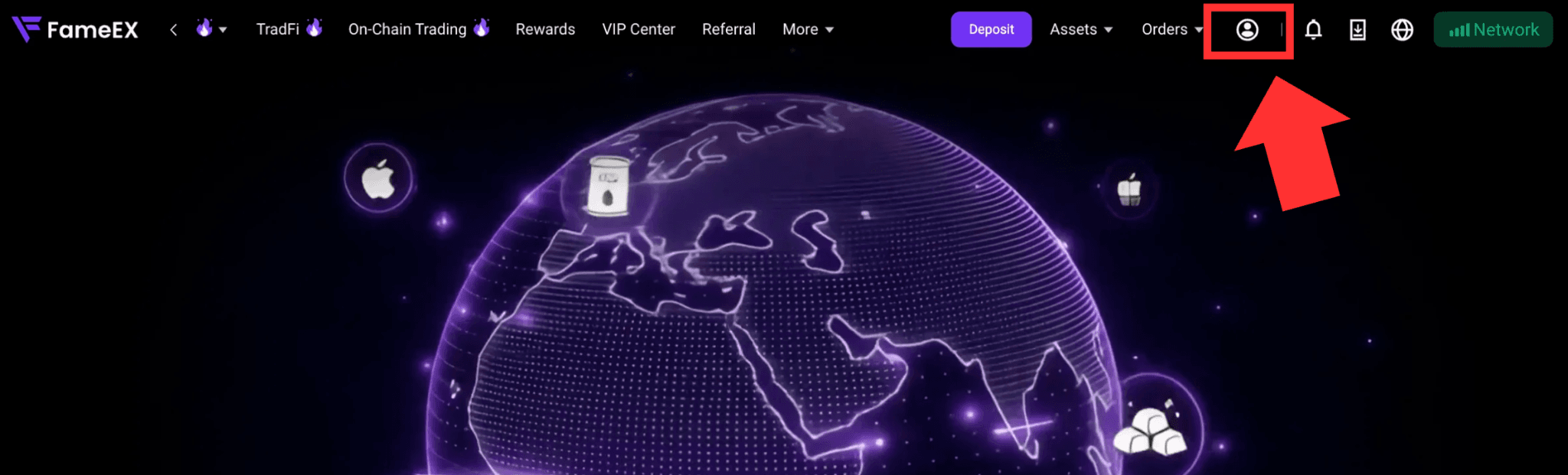
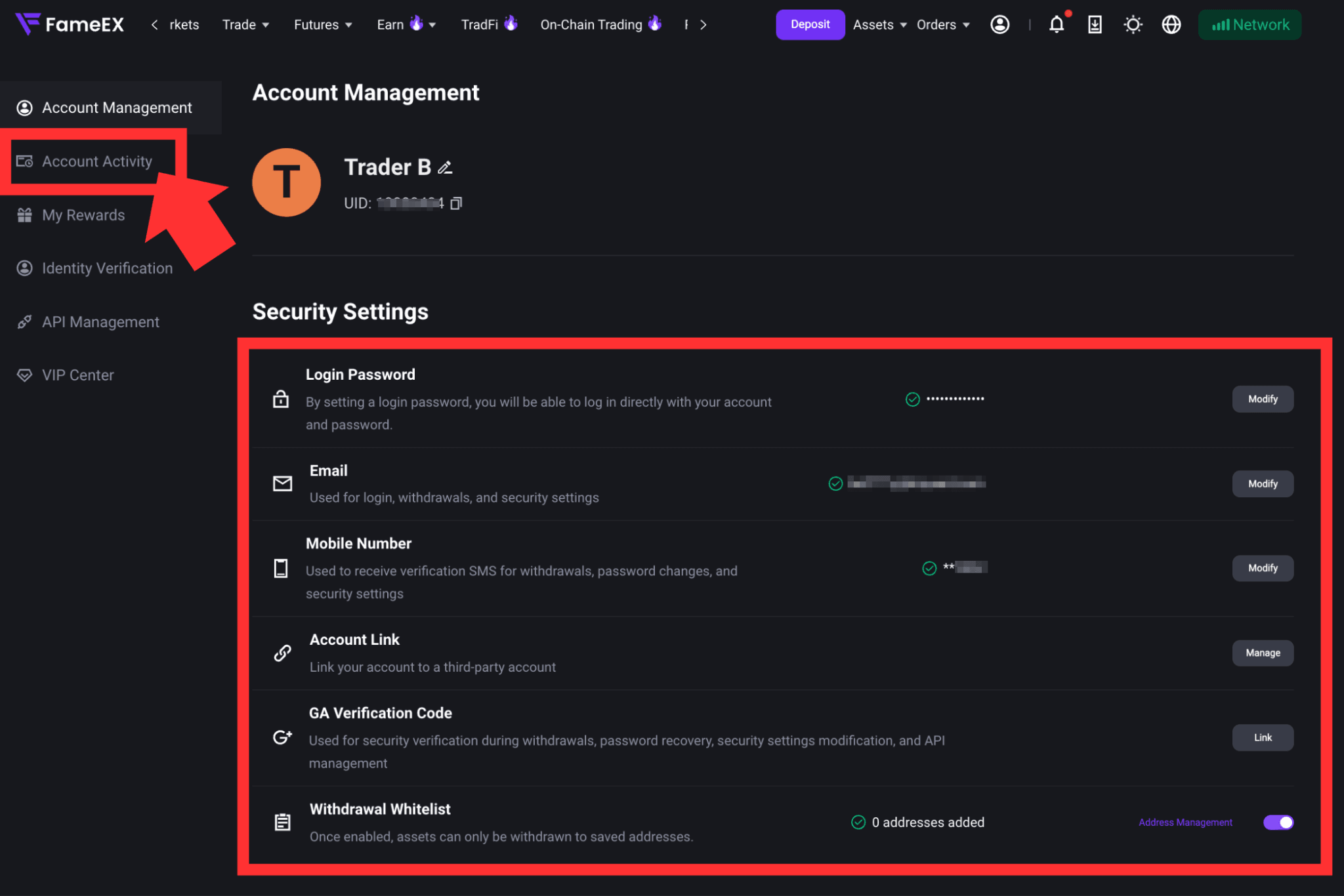
Log in to the FameEX website and click the [User Center] icon in the upper-right corner. Go to [Account Management] → [Security Settings] to view your login password, email, mobile number, Google Authenticator, withdrawal whitelist, and other available settings.
- App
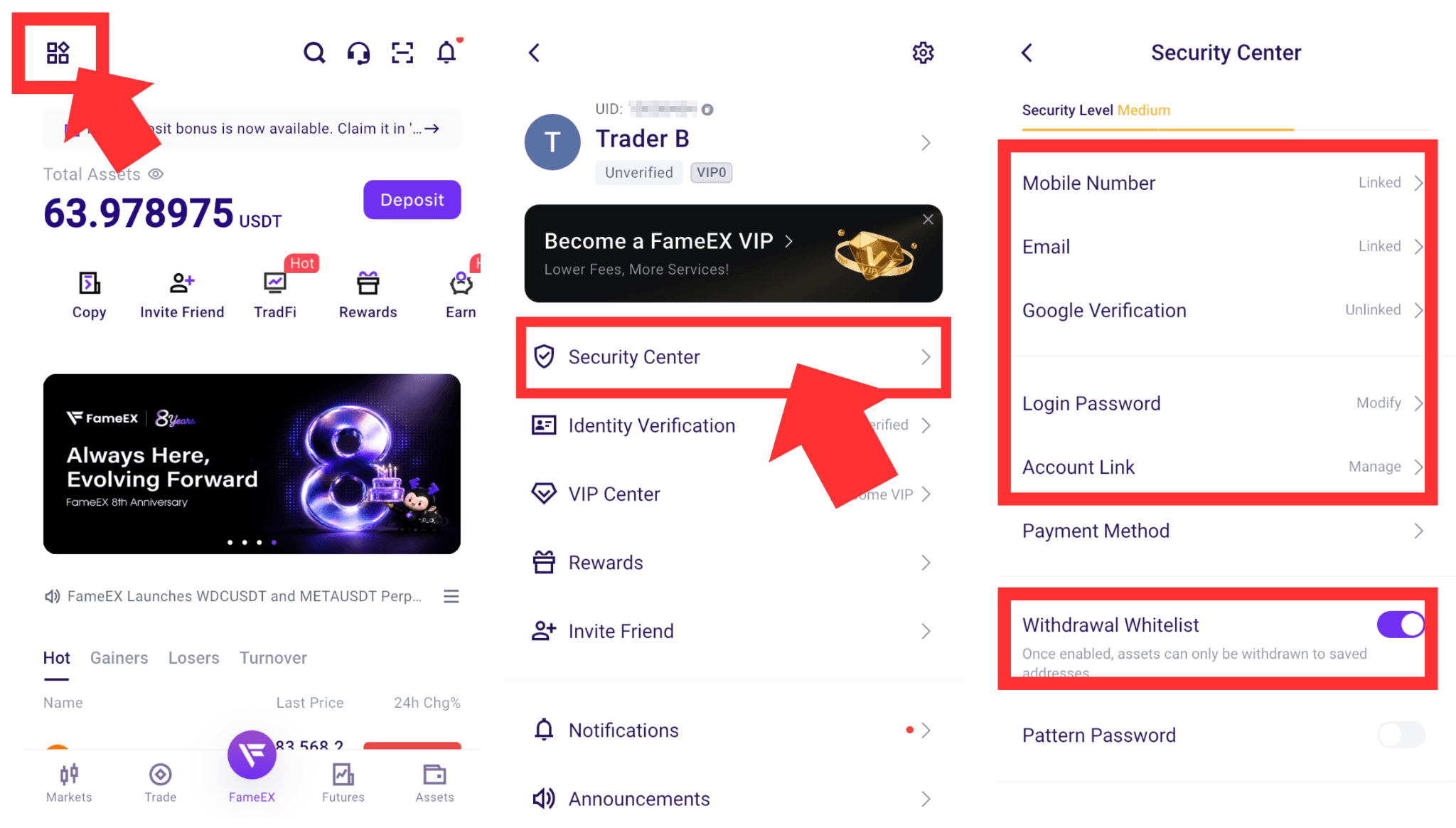
Open the FameEX App and log in to your account. Tap the [User Center] icon in the upper-left corner. Then go to [Security Center] to view and manage the supported account security features.
3. How to Manage Different Account Security Features?
1) Login Password
Your login password is a basic security measure that protects your FameEX account. We recommend using a strong, unique password that is difficult to guess. Avoid reusing passwords from other platforms and keep your login credentials secure.
To change your login password, go to [Login Password] under [Security Center]. If you have forgotten your password, you can reset it through the FameEX login page.
2) Email Verification
Email verification allows you to receive security verification codes and important account notifications. We recommend linking an email address that you regularly use and can reliably receive messages at.
If you need to change your linked email address, you can update it under [Security Center]. You will need to complete the required identity verification before the change takes effect.
For detailed instructions, please refer to:
- How to Change Your FameEX Account Email Address? (Web)
- How to Change Your FameEX Account Email Address? (App)
3) Mobile Number Verification
Mobile number verification uses SMS verification codes to confirm your identity. It provides additional security for account verification and other important actions. We recommend linking a mobile number that you currently use and can receive SMS messages on. If your linked number is no longer active or needs to be changed, update it promptly to avoid issues with future security verification.
For detailed instructions, please refer to:
- How to Change Your FameEX Account Mobile Number? (Web)
- How to Change Your FameEX Account Mobile Number? (App)
4) Google Authenticator
Google Authenticator is a two-factor authentication (2FA) tool that generates regularly updated verification codes. These codes can be used for important account actions such as logging in, withdrawing funds, and changing security settings.
Once Google Authenticator is enabled, you can use its verification codes whenever additional identity verification is required. We recommend keeping your authenticator setup key in a secure location. This can help prevent verification issues if you lose or replace your phone. To link, change, or disable Google Authenticator, go to your FameEX security settings and follow the on-screen verification instructions.
5) Withdrawal Whitelist
The withdrawal whitelist provides an additional layer of security for cryptocurrency withdrawals. You can add approved wallet addresses to your address book. Once the feature is enabled, withdrawals can only be made to addresses on your whitelist. This helps reduce the risk of sending funds to unapproved destinations.
You can manage this feature under [Withdrawal Whitelist] in [Security Center] on the FameEX website. When adding or updating an address, always verify the cryptocurrency, blockchain network, and withdrawal address carefully. Incorrect address information may result in the permanent loss of funds.
4. What Should You Know About Account Security Settings?
1) Enable Multiple Security Verification Methods
In addition to your login password, we recommend enabling email verification, mobile number verification, and Google Authenticator to strengthen account protection. Some security changes require verification through another method already linked to your account. Make sure your existing verification methods are available and working properly before making changes.
2) Important Security Changes May Trigger Withdrawal Restrictions
To protect your account and assets, withdrawals will be suspended for 24 hours after you change your login password, linked email address, or mobile number. Changes to other security features, including Google Authenticator, may also trigger temporary withdrawal restrictions. Please refer to the notices shown on the relevant page for the applicable restriction period.
3) Keep Your Account and Verification Information Secure
Never share your login password, email verification codes, SMS verification codes, Google Authenticator codes, or authenticator setup key with anyone. Always use the official FameEX website or App when managing your account. Avoid logging in through unfamiliar links or websites.
4) Contact Official Support If You Experience Verification Issues
If you can no longer use your linked email address or mobile number, cannot obtain Google Authenticator codes, or notice unusual account activity, please contact FameEX Online Support for assistance. Follow the security verification instructions provided by the support team to resolve the issue.
5. Frequently Asked Questions (FAQs)
Q1: Do I Need to Enable All Security Verification Methods for My Account?
A: We recommend enabling multiple security verification methods based on your account needs. Email verification, mobile number verification, and Google Authenticator can provide additional protection. Some features may require another security method to be set up first. Please refer to the requirements displayed on the relevant page.
Q2: Why Can't I Withdraw Funds After Changing My Security Settings?
A: FameEX applies temporary withdrawal restrictions after certain security changes to reduce the risk of unauthorized account modifications and withdrawals. Withdrawals will be suspended for 24 hours after you change your login password, linked email address, or mobile number.
Q3: What Should I Do If I Can No Longer Use My Original Verification Method?
A: If you cannot receive verification codes through your linked email address or mobile number, or can no longer use your original Google Authenticator, please contact FameEX Online Support for assistance. Additional identity verification may be required to protect your account.